Software Management in Safe Haven Services
System software and user software
All system-level software installed and configured in the Safe Haven is managed by the SHS Platform team.
Users are given access to Safe Haven controller-approved online sources such as PyPi and CRAN to install and manage additional software specific to their projects.
Users can also import packaged or containerised code via a request to their research coordinator. For more details on how to prepare containers for Safe Havens, check the Safe Haven container service documentation.
System maintenance
Minor system-level software changes and patches will be made as soon as admin effort can be allocated. Major changes and patches are likely to be scheduled for the SHS monthly maintenance session including all Safe Haven services on the first Thursday of each month.
Depending on the type of maintenance, the service may be at risk and inaccessible during this period. The type of maintenance will be announced in advance via email.
Managing R packages post-maintenance
During some Safe Haven maintenance windows, the version of R is upgraded. When this happens, there are some additional steps required by the user to get some packages (such as Tidyverse) to work correctly. If you have not logged in since the last maintenance period when R was upgraded or are having issues with R package installations, please follow the instructions below in the first instance.
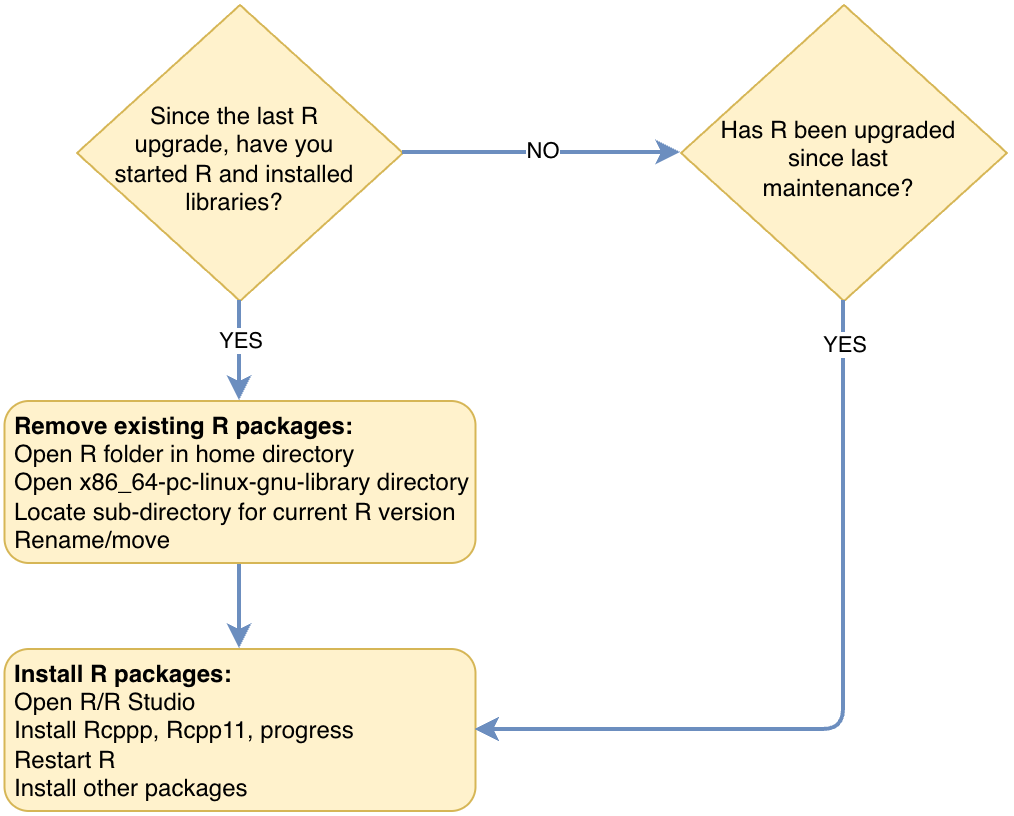 R maintenance decision tree
If you are currently using R and have installed any libraries since the last R version upgrade and have not yet logged in, or tried to reinstall packages, you need to carry out the following two steps.
If R has been upgraded to a newer version or if you have just started using R you can skip to Step 2.
STEP 1: Removing existing installed R packages
- Either via a command line or the file manager open the R folder within your home directory, and then open
x86_64-pc-linux-gnu-librarydirectory. - Inside this directory you should see a list of version numbers, these match the versions of R you have previously used.
- Locate the directory with the current version of R and rename it if using the GUI, or move (
mv) if using the command line. This will prevent R from loading these libraries and next time it opens it will create a new directory.
STEP 2: Installing dependencies
This step should be completed by all R/RStudio users.
- Open R or R Studio.
- You need to install the following packages before anything else:
RcppRcpp11progress
This can be done by running the following R command:
install.packages("Rcpp", "Rcpp11","progress")
- We recommend restarting R/R Studio prior to beginning to install your other packages.